

Modern Scalable Web Application Architecture — Explained Simply
Ankit Suyal
@ankitsuyal
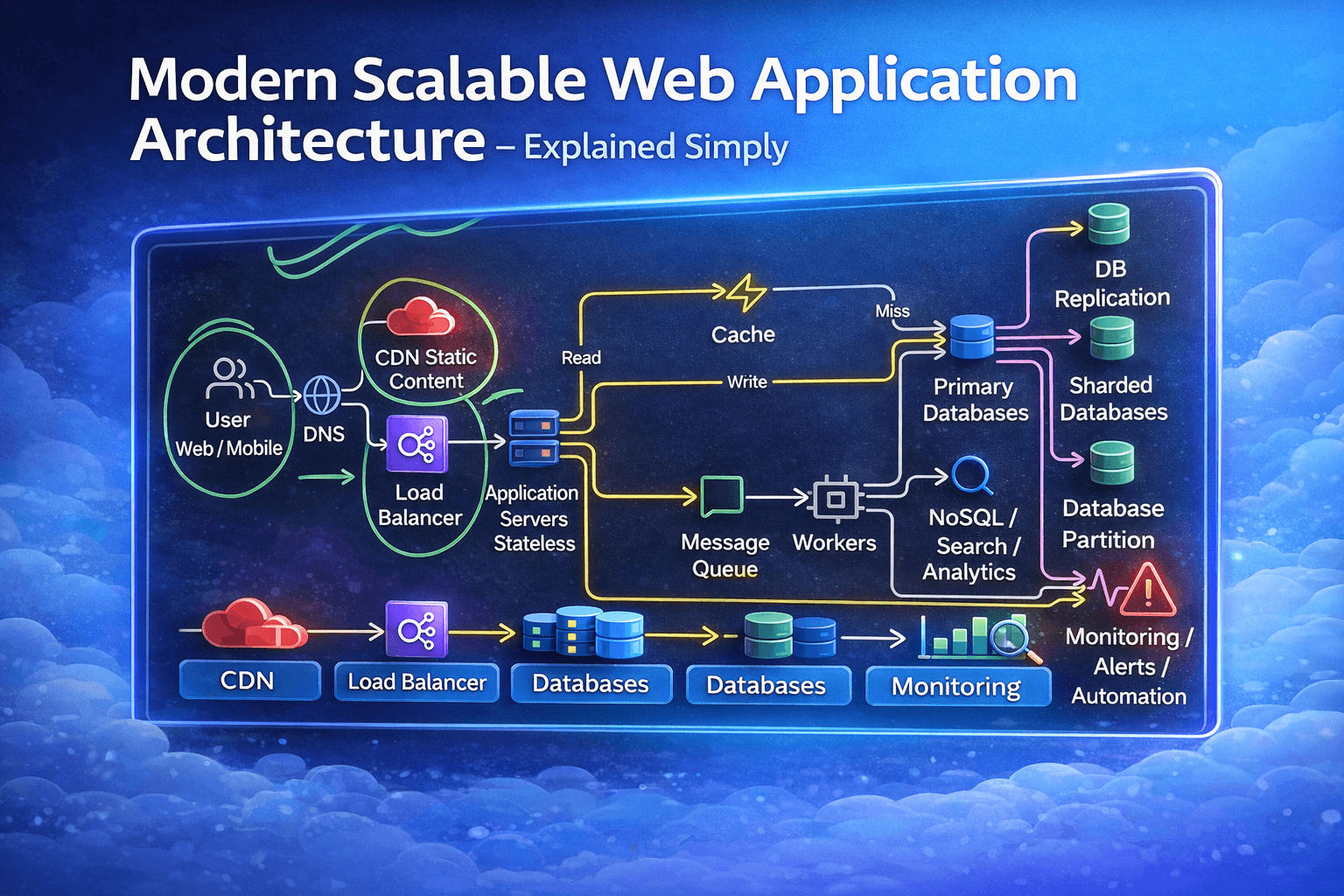
When you open a website or mobile app, it feels instant.
But behind that simple interface, there is a powerful system working quietly in the background.
This diagram represents a modern, scalable production architecture — the kind used by SaaS platforms, e-commerce systems, fintech apps, and large-scale products.
Let’s break it down in a simple and practical way.
1 User (Web / Mobile)
Everything starts with the user.
Someone:
- Opens your website
- Uses your mobile app
- Logs in
- Searches for something
- Submits a form
That action creates a request.
This request begins its journey through your system.
2 DNS – Finding the Server
Before anything happens, DNS translates your domain name into a server IP address.
Think of DNS as the internet’s phonebook.
Without DNS, the browser wouldn’t know where to send the request.
3 CDN – Static Content Delivery
Not all content needs heavy processing.
Static assets like:
- Images
- CSS
- JavaScript
- Fonts
- Videos
are served through a CDN (Content Delivery Network).
CDNs store copies of your static files in multiple global locations.
This means:
- Faster loading
- Lower latency
- Reduced load on main servers
- Better global performance
4 Load Balancer – Traffic Manager
After static content is handled, dynamic requests move forward.
The load balancer decides:
Which server should handle this request?
If you have multiple backend servers, the load balancer distributes traffic evenly.
This ensures:
- No single server overload
- High availability
- Better performance
If one server crashes, traffic is automatically redirected.
5 Application Servers (Stateless)
These servers handle your business logic.
They:
- Authenticate users
- Process requests
- Apply rules
- Communicate with databases
They are stateless, meaning they do not permanently store session data.
Why stateless?
Because this allows you to:
- Scale easily
- Replace servers anytime
- Handle failures smoothly
Stateless systems are easier to scale horizontally.
6 Cache – Speed Booster
Before going to the database, the system checks the cache.
Cache stores frequently requested data like:
- Popular products
- Trending posts
- Session tokens
- Repeated queries
If data exists in cache → response is extremely fast.
If not → it goes to the database (called a cache miss).
Caching:
- Reduces database load
- Improves performance
- Handles high traffic efficiently
7 Primary Database – Core Storage
This is where your main data lives.
It stores:
- User accounts
- Transactions
- Orders
- Application data
All important writes usually go here first.
8 Database Replication – Reliability Layer
To prevent failure and improve performance, databases use replication.
This means:
- One primary database handles writes
- Multiple replica databases handle read operations
Benefits:
- Improved read performance
- Fault tolerance
- Data redundancy
If the primary fails, a replica can take over.
9 Database Sharding – Scaling Data
When your application grows massively, a single database isn’t enough.
So data is split into partitions (shards).
For example:
- Users A–M in one shard
- Users N–Z in another
This allows:
- Horizontal scaling
- Handling millions of users
- Better performance at scale
10 Message Queue – Asynchronous Processing
Not everything needs to happen instantly.
Tasks like:
- Sending emails
- Processing payments
- Generating reports
- Running background jobs
are sent to a message queue.
This keeps the main application:
- Fast
- Responsive
- Non-blocking
11 Workers – Background Executors
Workers pick tasks from the message queue.
They process:
- Background jobs
- Heavy computations
- Delayed operations
This separates real-time user requests from heavy backend tasks.
12 NoSQL / Search / Analytics
Some data requires special handling.
Search systems, analytics engines, and NoSQL databases are optimized for:
- Large-scale queries
- Fast indexing
- Flexible data models
These systems power:
- Advanced search
- Real-time dashboards
- Big data insights
13 Logging, Monitoring & Alerts
A serious production system must observe itself.
The system tracks:
- Errors
- Performance metrics
- CPU usage
- Memory usage
- Request latency
Monitoring systems then:
- Send alerts
- Trigger automation
- Prevent downtime
This ensures stability and reliability.
Why This Architecture Matters
This design provides:
-
Scalability
You can add more servers easily. -
Reliability
Failures don’t break the entire system. -
Performance
Cache + CDN reduce latency. -
Fault Tolerance
Database replication protects data. -
Flexibility
Message queues handle heavy background tasks.
The Bigger Picture
A simple website can run on a single server.
But serious applications require:
- Distributed systems
- Traffic management
- Database scaling
- Monitoring and automation
- Redundancy and failover strategies
This is how modern cloud-native systems are built.
If you're building something meant to scale —
understanding this architecture is essential.
Because real engineering is not just about writing code.
It’s about designing systems that survive growth.
Loading comments…